Pool Party Flyer: Ultimate Guide to Design & Efficient Execution
Most communication suffers from information overload, and a pool party flyer is no exception.
More often than not, a pool party flier tries to be a graphic design portfolio piece, a complete event schedule, a color palette showcase, and then some. The result is a flyer that looks busy, but the essential information does not pop.
A good pool party flyer does one thing: it makes the reader want to come to the party, and it tells them everything they need to know to get there. Period. That is the whole job. The design serves that goal, not the other way around.
In this ultimate guide, I tell you what belongs on a pool party flyer, free tools to make one without a design background, simple & basic design principles, templates to look for, and distribution.
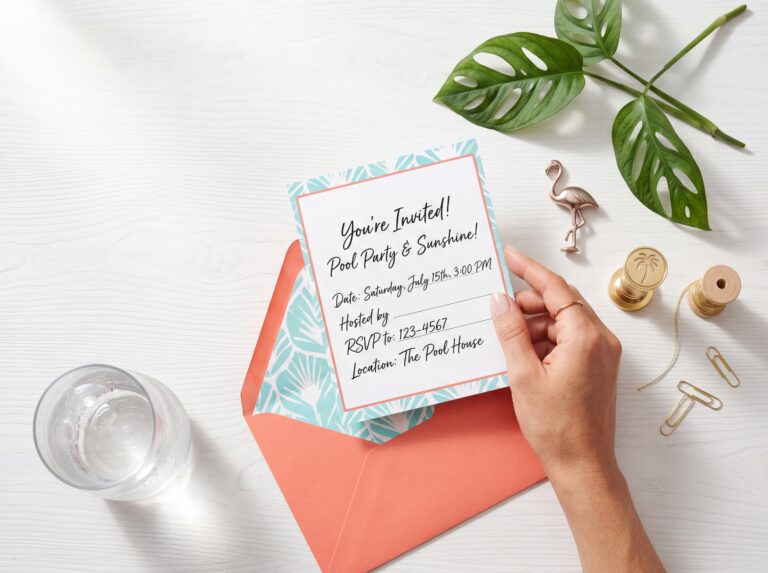
What Belongs on a Pool Party Flyer
Before opening any design tool, it helps to know exactly what information belongs on the flyer and what does not.
Must-have information:
The party name or occasion — a birthday, a neighborhood cookout, a work event, a school end-of-year party. If it is a birthday, whose birthday and which one?
The date, including the day of the week. “Saturday, July 12” is more immediately readable than “July 12” alone — the day of the week is the first thing most people check against their own schedule.
The time, both the start time and end time. End time matters more at a pool party than at most events because guests are planning for swimwear, sunscreen, and post-party logistics. A party that ends at 3 p.m. requires different planning than one that ends at 7 p.m.
The address. Full street address including city and zip code. For a private residence, a neighborhood name or cross street is a useful addition — “off Granny White Pike” or “in the Brentwood Reserve subdivision” — that helps guests, who are new to the area, orient themselves before the GPS takes over.
An RSVP contact — a phone number, an email address, or a link to a digital RSVP form. If the RSVP has a deadline, include it. “RSVP by July 5” prevents the week-before scramble of uncertain headcounts.
📣 Splash Bash Pass manages your guest list and RSVP tracking in one place — so the flyer points guests to a real system rather than a phone number the host has to manually manage. Try it free →
Optional but useful:
What to bring — swimsuit, towel, sunscreen, a dish to share if it is a potluck. This information reduces the day-of texts from guests who forgot that a pool party requires preparation.
A dress code, if there is one — all-white, tropical, retro, neon. Themed parties without a dress code note on the flyer produce guests who arrive underdressed for the aesthetic and feel it.
A note about food — “lunch provided,” “BYOB,” or “snacks and dessert” — sets expectations that prevent both overbringing and underbringing.
What does not belong:
A detailed schedule. The flyer is the invitation, not the event program.
Long blocks of text. If it takes more than thirty seconds to read, it is too long. Avoid a paragraph of backstory. Nobody reads it. Nobody really cares.
More than two or three graphic elements. Design restraint is the difference between a flyer that reads as professional and one that reads as a Canva template left uncurated.
Free (and some paid) Tools to Make a Pool Party Flyer
Canva
Canva is the most practical answer for most people making a pool party flyer without a design background.
The free tier includes enough templates and design elements to produce a strong result, and the interface is genuinely intuitive — most people with no prior design experience can produce a presentable flyer within thirty minutes.
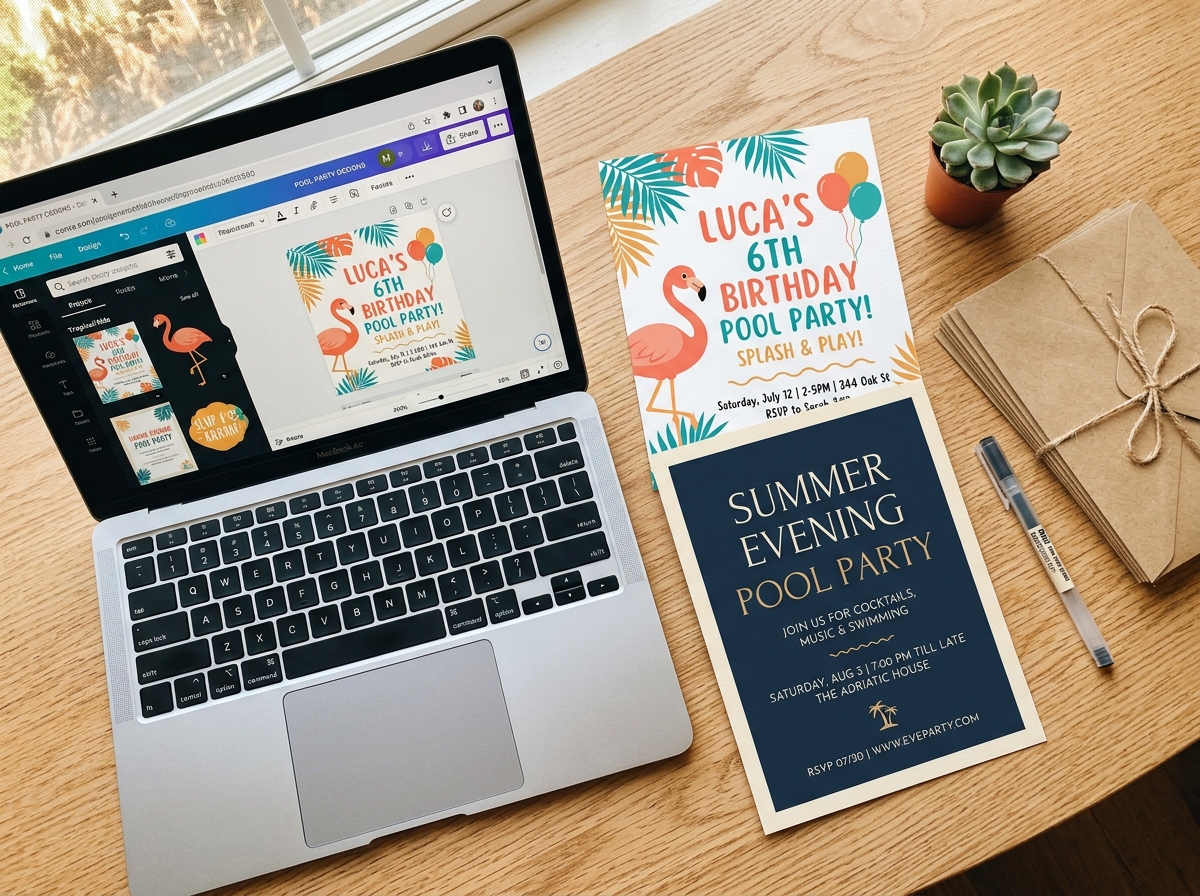
Search “pool party flyer” or “pool party invitation” in the Canva template library and filter by the format you need: a digital flyer (standard 1080×1080 or 1920×1080 for social sharing), a printable letter-size (8.5×11 inches), or a smaller 5×7 card format.
The templates in Canva range widely in quality. The ones worth using have a strong visual hierarchy — the most important information is largest, the secondary information is smaller, and the decorative elements do not compete with the text.
The ones to avoid are templates where every element has the same visual weight, and the eye does not know where to land.
After selecting a template, replace all the placeholder text before making any design changes. Getting the information right first and then adjusting the design around it produces better results than perfecting the design and then trying to squeeze in the details.
Evite and Paperless Post
For digital-only flyers, Evite and Paperless Post are designed specifically for event invitations and handle the RSVP function natively. Guests can respond directly through the platform, and the host receives a running headcount without managing a separate spreadsheet.
Both platforms have pool party-specific templates. The design options are more constrained than Canva, but the integration with the RSVP system more than compensates for the reduced design flexibility.
Evite’s free tier is sufficient for most residential pool parties. Paperless Post offers a more premium aesthetic and charges per envelope sent — worth the cost for smaller, more formal events where the design quality communicates something about the occasion.
Adobe Express
Adobe Express (formerly Adobe Spark) is the slightly more capable alternative to Canva for users who want more design control without learning professional tools.
The free tier includes pool party templates and a larger stock photography library than Canva’s free offering.
The interface is slightly less intuitive than Canva, but the output quality, particularly for photographic flyers, is meaningfully better when the template is used well.
Printed flyers
For neighborhood parties, school events, or community pool gatherings, physical distribution is needed; a printed flyer requires a few additional decisions.
Paper weight matters more than most people realize.
A flyer printed on standard 20 lb copy paper reads as cheap regardless of how good the design is. A flyer printed on 60 to 80 lb cardstock reads as intentional.
If the flyer is being printed at home, the paper is worth buying specifically for this purpose.
Color printing on white cardstock produces the most endearing result. If the budget allows, a local print shop can produce 50 to 100 flyers on quality cardstock for $15 to $30. Such an upgrade is often worth the cost for a larger community event.
📣 Splash Bash Pass manages your guest list and RSVP tracking in one place — so the flyer points guests to a real system rather than a phone number the host has to manually manage. Try it free →
Pool Party Flyer: Basic Design Principles
Information hierarchy is critical
Before choosing a font or a color, decide which piece of information is most important, which is second most important, and which is a supporting detail. Then design the flyer so the visual weight of each element reflects that order.
For most pool party flyers, the hierarchy is:
- The party name or occasion — largest text on the page
- The date and time — second largest, immediately below or near the party name
- The address — third, slightly smaller
- The RSVP information — fourth, smallest of the primary elements
- Supporting details (what to bring, dress code, food note) — smallest text, often at the bottom
When every element is the same size and the same visual weight, the eye does not know where to start.
When the hierarchy is clear, the eye moves through the information naturally, and the guest absorbs everything they need without effort.
Use two fonts maximum
The flyer design mistake that shouts “amateur” is having too many fonts. Three or more fonts on a single flyer is visual noise that undermines even a strong underlying design.
A professional will typically use only two fonts. The unwritten rule for a pool party flyer is one display font for the party name and primary headline, and one body font for all supporting information.
The display font can be decorative, hand-lettered, or thematic. The body font should be a clean, readable sans-serif or simple serif — never decorative.
In Canva and Adobe Express, any combination of one display font and one sans-serif body font from the same “pairing” suggestion will work. The platforms do the typographic pairing work, so the designer does not have to.
Two colors plus white or black
The same logic that applies to pool party decoration palettes applies to flyer design: two colors plus a neutral.
Pick the primary and accent color from the party palette — if the party is tropical and the decoration palette is deep green and coral, the flyer is deep green and coral — and use white or black for text and background.
A pool party flyer designed in the party’s palette does double duty: it communicates the theme visually, and it sets the aesthetic expectation before the guest has read a single word.
The trap to avoid: using every pool-related color that exists on one flyer. Blue, teal, coral, yellow, green, and white together do not look like a pool party — they look like clip art. Pick two and hold the line.
Photography versus illustration
Most Canva pool party templates use either stock photography (a pool, a splash, a group of people at a party) or flat graphic illustration (flamingos, pool floats, palm trees). Both work, but they communicate differently.
Photography reads as more realistic and more personal — a good choice for adult parties, neighborhood events, or occasions where the real venue or real people are part of the design.
Illustration reads as more playful and more themed — a better choice for children’s parties, themed events, and situations where the visual tone is more important than the realistic depiction.
- For a children’s birthday pool party: illustrated templates in bold color.
- For an adult neighborhood pool party: a clean photographic template or a minimal typographic design.
- For a corporate or school event: a clean typographic layout without strong character illustration.
White space is not wasted space
The most common amateur flyer design mistake is filling every available space. Professionals do not consider white space — areas of the design left intentionally empty — as wasted space.
It is the white space that makes the information and graphic elements readable and visually weighted. Basically
A flyer with breathing room around the text and graphic elements reads as confident. A flyer with every corner filled reads as insecure.
When a design feels busy or overwhelming, the fix is almost always removal rather than addition. Delete one graphic element. Increase the margins. Reduce the number of text blocks. The result will be a stronger design without exception.
Pool Party Flyer Templates by Party Type
Kids’ birthday pool party
The template to look for: bright primary colors, large, playful display font, a swimming or pool-themed illustration (flamingos, pool floats, sharks, or cartoon waves), and clear space for the child’s name and age to be the largest text element on the page.
Search terms in Canva: “kids pool party invitation,” “birthday swim party flyer,” “shark pool party invitation,” “tropical kids birthday flyer.”
The design decision that matters most for a kid’s birthday pool party flyer: the child’s name should be the largest text element on the flyer. The party is for them. The design should reflect that before anything else.
Adult pool party or neighborhood gathering
The template to look for: a cleaner, more minimal design with a stronger typographic approach — the party name in a quality display font, supporting information in a clean sans-serif, and a color palette that reads as adult rather than child-birthday.
Search terms: “adult pool party flyer,” “summer pool party invitation,” “cocktail pool party flyer,” “neighborhood pool party template.”
The design decision that matters most for an adult flyer: the information hierarchy must be immediately clear. Adults tend to scan for information rather than read every word. A design that buries the date or requires hunting for the RSVP information will produce fewer responses.
Themed pool party
For a themed party — all-white, tropical, neon, retro — the flyer is the first communication of the aesthetic. The flyer design should match the party aesthetic.
An all-white pool party flyer should be clean and minimal, white-dominant, with a single refined font. A tropical pool party flyer should have lush botanical illustrations and warm, vivid colors. A neon pool party flyer should use a bold color and strong contrast. For example — black background + neon type = high-energy.
Search in Canva for the specific aesthetic: “all white party invitation,” “tropical pool party flyer,” “neon party invitation,” “retro pool party template.”
The flyer sets the aesthetic expectation. A guest who receives a neon-designed flyer arrives expecting a neon party. A guest who receives a clean, minimal flyer arrives expecting something more elevated.
The match between the flyer design and the party execution is what makes the occasion feel designed rather than assembled.
Corporate or school event
For a professional or school context, the design needs to communicate the event clearly without leaning on a strongly personal aesthetic.
A clean typographic design — the institution’s colors, if applicable, a simple pool illustration or none, all essential information clearly laid out — is the right approach.
Search terms: “corporate summer party flyer,” “school pool party invitation,” “company picnic pool party flyer.”
For school events specifically, include the school name or PTA affiliation in the flyer design so the communication reads as institutional rather than personal, which increases credibility with parents who are receiving it.
📣 Splash Bash Pass sends themed invitation details to your guest list automatically and tracks RSVPs as they come in — so the flyer sends people somewhere that actually works. Try it free →
How to Write the Flyer Text
The writing on a pool party flyer deserves as much attention as the design — because a beautifully designed flyer with poorly written text will still produce confusion, low RSVPs, and day-of questions.
The party name
If the party has a name beyond “[Child’s Name]’s Birthday Party” or “Summer Pool Party,” put it on the flyer.
“The Last Splash,” “Splash Bash 2026,” “The Henderson Pool Party,” “Surf’s Up at the Millers'” — a named event reads as a hosted occasion rather than an open invitation to come over. The name does not need to be clever. It needs to exist.
The date and time
Write the day of the week. Write the full date. Write the year if there is any ambiguity (parties planned months in advance often land on flyers without a year and are later confusing in a screenshot or email forward).
“Saturday, July 12, 2026” is a lot clearer and more useful than “July 12.”
Start time and end time both. “2 to 6 p.m.” tells guests exactly how to plan their day. “2 p.m.” leaves the end ambiguous and produces guests who arrive early and stay late, or guests who leave before the cake because they made a 5 p.m. commitment they were not sure about.
The address
Full address plus any orientation note that helps first-time visitors. “123 Maple Drive, Nashville, TN 37205 — park on the street, gate is on the left side of the house.”
For neighborhood or community events: include the pool or venue name as well as the address. “Henderson Park Community Pool, 456 Oak Lane” tells guests they are going to a specific venue, not a private residence.
The RSVP instruction
Be specific about how to RSVP and by when. A phone number invites a text. An email address invites an email. A link to a digital form (a Splash Bash Pass RSVP link, a Google Form, an Evite page) is the most efficient option for larger guest lists.
“RSVP by July 5 to [contact]” is specific and actionable. “RSVP appreciated” is neither, and produces the late-stage headcount uncertainty that makes catering and favor planning difficult.
The what-to-bring note
Two or three items at most. “Bring a towel, sunscreen, and your appetite.” “Swimwear encouraged, towels provided.” “Potluck — bring a dish to share if you can.”
This information, included on the flyer, eliminates a category of day-before questions that would otherwise land on the host’s phone.
Distributing the Flyer
Digital distribution
For most residential pool parties, digital distribution is sufficient and more practical than printing.
A flyer image (exported from Canva as a PNG or JPEG at the highest available resolution) can be shared directly in a group text, posted to a neighborhood Facebook or Nextdoor group, shared in a class parent WhatsApp, or emailed as an attachment.
For social media sharing, square format (1080×1080 pixels) works best across Instagram, Facebook, and the story formats that most people use to reshare invitations. A vertical 1080×1920 format works better for story-specific sharing.
PDF format is the right choice for professional or school events where the flyer is being emailed to a distribution list. A PDF maintains formatting across all devices and email clients in a way that an image attachment sometimes does not.
Printed distribution
For neighborhood events, school parties, or community pool gatherings where the audience does not share a single communication channel: print and post.
Post at community mailboxes, school pickup areas, neighborhood notice boards, and the community pool entrance (with permission from pool management).
For a neighborhood event, door-to-door distribution of a printed flyer produces higher attendance than any digital channel can reach in a neighborhood without a strong shared platform.
Timing: distribute printed flyers two to three weeks before the event for a weekend party. For a larger community event, three to four weeks.
The text message version
Regardless of what the designed flyer says, a plain text message version of the essential information should accompany any digital flyer distribution:
“[Name]’s Pool Party — Saturday, July 12, 2 to 6 p.m. — 123 Maple Drive — RSVP by July 5 to this number. Bring a towel and sunscreen. More details in the attached flyer.”
Busy people will read the text first. The flyer is for people who want the full picture. Both formats serve different reading behaviors in the same audience.
The Version You Actually Send
There is a version of the pool party flyer that takes forty-five minutes to make, looks polished, and communicates everything the guest needs.
There is also a version that takes three hours, includes twelve elements, and still leaves guests texting to ask what time the party ends.
The difference is almost always about scope rather than effort. The best pool party flyer is the one with the clearest information, the most restrained design, and the fastest path from “open the flyer” to “I know whether I am going and what I need to bring.”
Set a thirty-minute limit on the design. Choose a template that is already close to what you need rather than building from scratch. Replace the text first, adjust the colors to match the party palette, remove any design element that is not earning its place, and export.
The result will be better than the version that took three hours, because the constraints forced the decisions that matter.
📣 Splash Bash Pass handles the RSVP system behind the flyer — guest list management, headcount tracking, and reminder sends — so the invitation does its job from the moment it goes out. Try it free →
📋 Plan Every Detail With Marina
Splash Bash Pass is built to make pool party planning work from the first communication to the last Water Watcher rotation.
Meet Marina, the AI party specialist inside the app. Tell her your theme, your guest count, and your budget, and she builds the complete plan around it.
Here is what Marina handles:
🗓️ Guest list and RSVPs tracked in real time
💰 Budget tracking by category, planned vs actual
📣 Theme-matched invitations ready in seconds
📍 Top local vendors found near you via Google Maps
🛡️ Water Watcher assignments and safety checklists built in
☀️ Live weather monitoring with automatic backup plans
🎨 40+ curated themes with menus, décor, and music included
🪄 Paste your messy notes, and Marina organizes them instantly
Onboarding is completely free.